
Using Alcydeo
Firefox 153+ has its own package without YouTube. Chrome tab capture, Google Cast and AirPlay are unavailable in Firefox. Local processing depends on the codecs supported by that browser; the Firefox guide records the tested scope.
Play the video: Alcydeo detects it and updates the icon badge automatically. Open the popup, choose an available source quality and download. For HLS or DASH, first find qualities and keep the manager open during processing. Chrome requests HTTP/HTTPS site access at installation; you can limit it in Chrome or pause detection in settings. A direct download finishes when Chrome confirms that the file is saved. Use Show in folder to find it. Linked qualities of the same video share one card. Your selected quality remains after rescanning.
Sources / Activity. Downloads continue when this popup closes. Keep the manager tab open for segmented streams.
Video tools: Convert to MP4, Compress, Merge clips, Trim.
Automatic media detection
Detection starts automatically on allowed sites. Pause it here or restrict site access in your browser.
Clear history
Remove finished, failed and cancelled records and their temporary files from Alcydeo, across all pages and filters, including favorites. Saved files and active or paused downloads are kept.
Cloud — 0.1.55
Section titled “Cloud — 0.1.55”Library → Cloud → Destination → Share with Gofile
Library — 0.1.61
Section titled “Library — 0.1.61”Trim · Crop · Merge clips · Convert to MP4 · Compress · Cloud · Show in folder
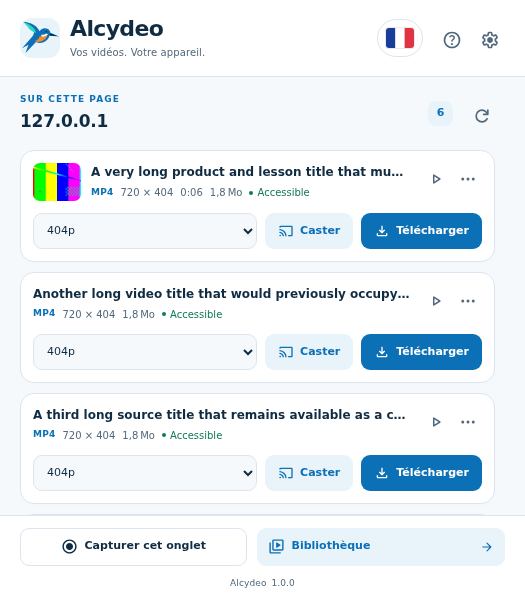
In the toolbar popup, choose a quality then Download. Cast is alongside it. The … menu holds trimming and recording. Tab capture and Library stay at the bottom while the source list scrolls; language, help and settings are in the header.
0.1.52
Section titled “0.1.52”TikTok uses the current post’s native media metadata and keeps up to three original CDN addresses per quality. A failed address may be replaced only after its own media check; downloads keep the selected quality and title. Server rate limits still require waiting. Keep the source page and manager open until saving finishes.
0.1.51
Section titled “0.1.51”Trim times are editable directly beside the video: enter seconds, m:ss or h:mm:ss with up to three decimal places. Handles and fields stay synchronized; an invalid interval cannot be exported. Segmented transfers preserve the original failure when other requests are stopped. A server rate limit still requires waiting; it is not bypassed.
0.1.50
Section titled “0.1.50”Direct, HLS and DASH proposals and badges appear after bounded media-prefix checks: at most two simultaneous background checks, without opening the popup. Uncertain sources stay hidden; Scan page retries them. Real checks cover the exact Instagram Reel, excluding recommendations, plus TikTok and Odysee. Access limits and challenges are reported; complete Odysee downloading remains unverified. Container dimensions appear when available. Consistent HTTP totals describe the complete source; ≈ marks estimates, never just an HLS initialization fragment’s size. Missing metadata stays unknown. Local YouTube SABR, playlist and capture prototypes keep distinct validation limits; this precheck does not certify their bytes. Compatibility remains limited.
0.1.49
Section titled “0.1.49”Separate audio and video sources belonging to the same HLS VOD are grouped after their tracks are checked. One proposal keeps the available qualities and combines both tracks. No additional URL normalization is applied; other formats and players remain subject to the documented limits.
Crop — 0.1.48
Section titled “Crop — 0.1.48”Select an area of the video to export as a new MP4. The original is kept.
Drag to draw a new area. Drag inside it to move, or use its handles to resize. Arrow keys move it by 1 pixel; hold Shift for 10 pixels.
0.1.47
Section titled “0.1.47”Assembled outputs that pass structural checks save automatically without a second click. Local browser playback no longer blocks saving; an unavailable codec may need another player. Older codec-playback failures with an intact retained output are saved without downloading again. Cancelling Save As still requires an explicit retry.
0.1.46
Section titled “0.1.46”Additional HLS VOD duplicates are grouped after comparing the download plan and sampled bytes; the original player URL is retained. The optional 2/4/8-connection setting can fetch compatible DASH audio and video tracks together. Splitting one resource requires a strong version validator and reliable byte ranges. Speed depends on the server and connection.
VK Video — 0.1.43
Section titled “VK Video — 0.1.43”VK Video: compatible DASH videos appear as one source with a quality selector. Playback fragments and interface sounds are excluded. Alcydeo combines the declared video and audio resources and saves a checked MP4. The supplied 7 min 53 s video was saved and fully decoded in 144p (AV1/Opus). Other codecs, live streams, private access and DRM are not universally supported. Keep the manager open during processing.
X — 0.1.38
Section titled “X — 0.1.38”X post pages: reload the post after updating Alcydeo. Native metadata supplies the video title and MP4 qualities, even with a Blob player. The current and legacy bootstrap data are read without executing scripts. Audio/video playback playlists are not offered separately when a complete file is available. The supplied post is saved and fully decoded as a 57.6-second AVC/AAC MP4. Feeds, private posts, live streams and every layout are not universally validated. No new permission, account, API or companion is required.
TikTok — 0.1.37
Section titled “TikTok — 0.1.37”TikTok post pages: Alcydeo reads the selected post’s native catalog even when its player uses a Blob. Qualities and codecs share one card with the real title. The source frame samples and streams the original file into local processing, without altered headers/signatures or a companion. Keep TikTok and the manager open; the popup may close. Interrupted files restart. The supplied 33-second AVC/AAC post is saved and fully decoded; feeds, live, private posts and every codec/layout are not universally validated.
YouTube playlist — 0.1.38
Section titled “YouTube playlist — 0.1.38”Local build only: on a YouTube playlist, available videos are checked initially. Uncheck any videos, choose a quality limit and start. Files are saved one at a time in a subfolder named after the playlist, with original positions and video titles. Keep the manager open; the popup may close. Resume skips already saved files; failed items can be retried separately. Metadata must load completely before starting (up to 5,000 entries / 100 pages). This uses native browse continuations and one muted owned player tab, without access bypass. Full real YouTube playlist transfers remain unvalidated. The Store package excludes this feature.
This evolving mix includes only the titles currently loaded by YouTube. Select the ones to save; future suggestions are not included.
Original quality indicates that the source resolution is unknown. Sources identified as HTML are removed. When a player redirect is observed, the title and resolution stay attached to the actual media file.
Some CDNs send MP4 as application/octet-stream. Alcydeo retains the observed final signed media URL and excludes HTML wrappers, error pages and HTML attachments. Restart the original player after reloading the extension.
The badge updates when a source is detected, while the page or its frames may still be loading. Available qualities are filled in afterward. The site must first expose a media source.
Alcydeo may reread detected playlists automatically to identify qualities and fragments. The extension downloads media fragments only when you start a download.
A source URL may return another HLS list. Alcydeo follows a unique rendition to expose its actual qualities and resolves your selected rendition when downloading, up to six playlist levels. If that quality disappears, choose again; encrypted sources remain unsupported.
Timed metadata (0x15) was omitted from the saved file.
clip.webm → clip-converted.mp4
MP4 conversion
MP4 with H.264 video and AAC audio. One file at a time; keep the manager open. The original is kept. Compatible tracks are copied; other supported tracks are re-encoded, which can take longer and change quality.
Video quality: Automatic · copy compatible video / High quality / Balanced / Smaller file.
Maximum resolution: Original · no enlargement / 1080p / 720p / 480p.
Audio bitrate: Automatic · copy compatible AAC / 128 / 192 / 256 kb/s.
Defaults for MP4 conversion. Quality, resolution or audio changes may require re-encoding. Size and speed depend on the source and your computer.
Conversion stays local. A copy of the selected source and the MP4 stay in browser temporary storage until the task is removed. The disk original is kept. File contents are not uploaded.
Conversion runs one file at a time. After a pause or manager closure it restarts from the saved input.
Saving files: Save automatically. Show Save As for every download.
Files use this subfolder of the browser download directory. Change the main directory in the browser download settings.
Simultaneous downloads — 1.0.0
Section titled “Simultaneous downloads — 1.0.0”New installation or settings reset: four simultaneous files; multipart enabled at four connections per compatible file. Existing choices are preserved. Both limits are adjustable; no universal speed gain is promised.
Files in parallel: 1 / 2 / 3 / 4 / 5 / 6 / 7 / 8.
1 to 8 files at a time, independently of connections per file. Queued files start as soon as a slot is free.
Lowering the limit lets current downloads finish. Conversions still run one at a time.
Multi-part downloads
Section titled “Multi-part downloads”Use multiple connections for compatible files and DASH.
Connections per file: 2 / 4 / 8.
Keep the manager open. Compatible audio/video tracks can download together. Splitting one resource requires reliable byte ranges and a strong version validator; otherwise standard transfer is used. Speed depends on the server and your connection.
Library
Section titled “Library”Your videos, downloads and processing jobs in one place.
Select this page · Convert to MP4 · Compress · Merge clips · Cloud · Delete selection
Files are processed one at a time. Original files are kept. Choose any missing local copies below.
Visual trim editor — Drag the handles to choose the start and end, preview the selection, then save it as MP4.
Visual merge editor — Drag clips to reorder them, or use the arrows. Click a thumbnail to preview a clip.
Compression defaults: Used for Compress in the library. Quality, maximum resolution and audio bitrate affect size and processing time.
Capture quality: 720p / 1080p / 4K. Keeps up to 4K at 30 fps with a higher bitrate. Detail depends on the captured source; enlarging pixels cannot restore missing detail.
Draw on the captured tab · Undo stroke · Clear drawing
Language: English / Español / Français / Deutsch / 简体中文 / العربية / Русский / Português / हिन्दी / اردو.
File extensions do not guarantee playback or conversion of every codec in your browser. M3U8 and MPD describe segmented streams.
MP4 · WEBM · M3U8 · MPD · M4V · MKV · TS · MOV · AVI · OGG · MPG · WMV · FLV · 3GP · M2TS · MTS
MP3 · AAC · M4A · FLAC · WAV
Ignore files smaller than: 10 KB / 100 KB / 1 MB / 2 MB. Unknown sizes remain visible. Playlist sizes are not video sizes.
One domain or URL per line, including its subdomains. All other sites are scanned when automatic detection is enabled.
Video tools
Section titled “Video tools”Trim a video or join clips in the order you choose. Processing stays on your device.
Local MP4 conversion to H.264/AAC. Unsupported codecs are reported.
Create a local H.264/AAC MP4 with the compression defaults in Settings. A smaller file is not guaranteed.
Choose 2–20 clips and order them. MP4 is normalized up to 720p/30 fps. Each clip must have one video track and the same audio layout.
Drag the handles to choose the start and end, preview the selection, then save it as MP4.
Record stream
Section titled “Record stream”Live — Records a supported HLS live source directly. Other playing sources use tab capture.
Player stream — Save received HLS segments directly, keeping the source quality. This mode supports unencrypted TS/fMP4 with audio and video in the same stream. Keep the manager open. For other sources use Tab capture.
Starts at a recent complete segment, which may include a few seconds before your click. Stop and save finishes the current segment, then creates a checked MP4. Earlier broadcast content is not recovered.
This live stream has separate audio. Use a combined HLS source or Tab capture; no silent video-only file is saved.
Live recording was interrupted. Save the received part; missing broadcast time cannot be recovered.
Tab capture — Capture the current tab from the popup, or choose a screen here. Uses a higher bitrate and up to the source resolution. Keep this manager open.
Cloud — 0.1.57
Section titled “Cloud — 0.1.57”Send only the file you choose, when you click Send. No automatic synchronization.
Send to all clouds without setup
Gofile · MegaUp · 1fichier · Turbobit. Each service keeps its own limits.
Delete temporary files — 0.1.58
Deletes local Cloud copies and cancels queued uploads. Originals and sharing links are kept.
Share a link : Gofile / MegaUp / 1fichier / Turbobit. Save to cloud storage : pCloud.
Gofile needs no sign-in and creates a public sharing link. Anyone with the link can access the file. Retention follows Gofile’s rules.
Experimental sharing without an account. Files are public and may expire after 30 days without activity. Keep your original file.
Experimental sharing without an account. Anyone with the link can access the file. Storage is not guaranteed after 15 days; keep your original. Availability may be delayed after sending.
Experimental sharing without an account, up to 200 MB per file. Anyone with the link can access it; guest storage lasts up to 7 days. Keep the original and check the file on Turbobit.
No sign-in here: paste an existing pCloud upload link and choose the folder’s data region. The folder owner needs a pCloud account. This deposits your file in that folder; it does not create a public download link.
Upload link or code — Folder’s data region: Europe / United States.
Retrying sends the whole file again. If the last response was lost, check the destination first to avoid a duplicate.
Keep the manager open. A temporary local copy holds the selected file. Removing a cloud entry clears its local copy and leaves the remote file.
Cloud protocols are tested locally. Real provider transfers still need validation; MegaUp is experimental. pCloud needs an existing upload link.
Delete temporary files — 0.1.63
Section titled “Delete temporary files — 0.1.63”Deletes local Cloud copies and cancels queued uploads. Originals and sharing links are kept.
Temporary files deleted. Transfer history and sharing links are kept.
A transfer or preparation is in progress. Wait for it to finish or cancel it before cleaning up.
Checking source…
Section titled “Checking source…”A small sample is checked before download. This does not validate the complete file. Refresh to test the proposals again.
The check found an invalid, unavailable or too-small source. Reload the original player, then scan again.
This source is smaller than the minimum size selected in Settings.