
Emulytics
Self-hosted · Apache-2.0 · Android orchestration
THE PRODUCT
One place to prepare, launch and understand
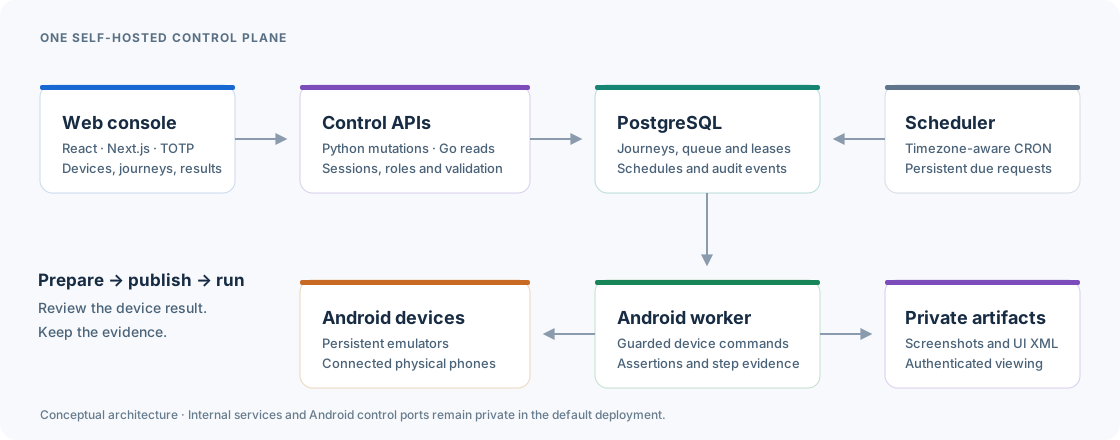
Emulytics separates device preparation, journey creation and execution. Describe an objective, review a published version, choose the devices and follow what actually happens.
Explore the product- Deployment
- Your Linux host and Docker stack
- Devices
- Persistent emulators and connected Android phones
- Evidence
- Live screens, screenshots and observed results
- Access
- Five roles, passwords and mandatory TOTP
FROM INSTALLATION TO FIRST RESULT
A guided path in four stages
Prepare
Check Docker and KVM, run the installer and secure the first account.
Describe
Write the objective. Review the supported steps and publish a version.
Execute
Select ready devices, confirm a launch or choose a timezone-aware schedule.
Understand
Follow the active screen, inspect captures and diagnose the outcome.
Clone the project, then install the complete local stack
git clone https://github.com/drslid/Emulytics.gitcd Emulytics./scripts/install.sh --accept-android-licenseRequires Linux x86_64, local Docker Engine/Compose, KVM, 8 GiB RAM and 25 GiB free storage. Review Android SDK terms before accepting the license option.
Read the installation guideDOCUMENTATION
From your first journey to daily operations
CURRENT SCOPE
Clear capabilities, visible limits
The reproducible runtime is Android 10 / API 29 on Linux x86_64. Reference natural-language journeys are available; iOS and universal third-party application automation are not part of this release.